Digital marketing has a new battlefield, and it’s brutal.
For years, the fight was about ranking on Google. Now a big chunk of that fight has shifted somewhere else entirely: ChatGPT, Claude, Perplexity, Google AI Overviews.
Welcome to the zero-click era, where people ask a question and get a full answer without visiting a single website, and AI visibility, not search rank, decides who gets mentioned in it.
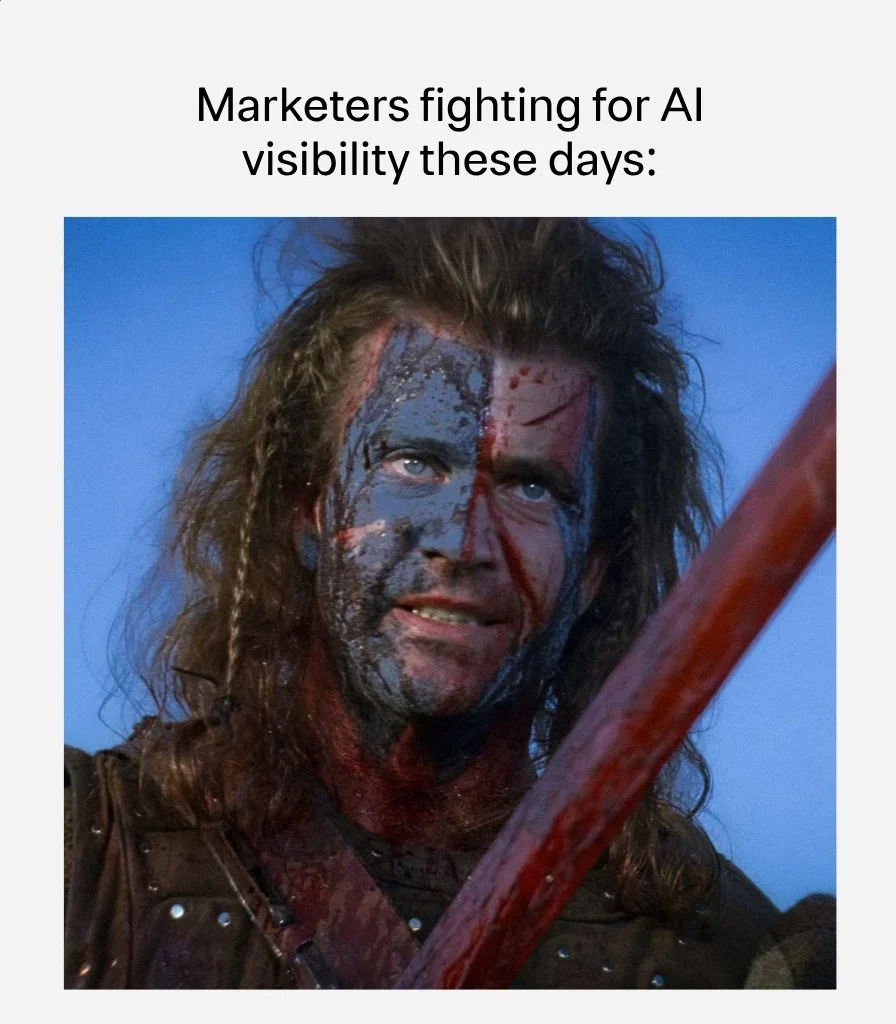
Every brand wants to be the one AI mentions in that answer. Doesn’t matter if you’re selling software, running a blog, or shipping physical products, everyone is now scrambling to get cited, quoted, or recommended inside these AI-generated responses.
Here’s the real problem though. Most of us are fighting this war blind. We don’t know if AI is citing us at all, how many of these “battles” we’re winning, or where a competitor is quietly taking our spot.
That’s the exact gap Rank Math built AI Visibility to close.
Key Takeaways
What is Rank Math AI Visibility?
It’s an AI visibility checker Rank Math provides directly inside WordPress. It works as your AI visibility tracker on ChatGPT today, with Perplexity, Gemini, Claude, and Google AI Overviews rolling out soon. It rolls everything into one clear AI visibility score. It also works as an AI citation tracker and checker, showing exactly when and where AI platforms cite you, along with the sentiment behind each mention. Think of it as an AI SEO checker built for the zero-click era. Mentions, citations, sentiment, and competitor rank, all in one dashboard. No more guessing whether AI knows your brand exists.
Why Regular Rank Tracking No Longer Tells the Full Story
Regular rank tracking has one job. It shows where your keywords sit on Google, and tools like Rank Math’s own rank tracker (I covered it in my Rank Math SEO Plugin Review) handle that part well.
But that’s only half the picture now. The other half happens the moment someone asks ChatGPT, Claude, Perplexity, or Google AI Overviews that same question instead of typing it into Google. A regular rank tracker has no visibility into any of that. It can’t tell you if your brand got mentioned, skipped, or replaced by a competitor.
If a competitor gets recommended by an AI platform and you don’t, you lose that customer before you even know they existed. That’s the exact gap AI Visibility closes. Think of it as rank tracking, but for AI answers instead of search results pages.
How AI Visibility Works
Step 1: Add Your Brand or Product
Head to Rank Math SEO → AI Visibility and click Add Brand or Product. Fill in the brand or product name, the URL, and a description of what it does, who it’s for, and what makes it different. This description matters more than it looks. It’s what helps the AI model tell your brand apart from competitors instead of lumping you in with everyone else in your space.
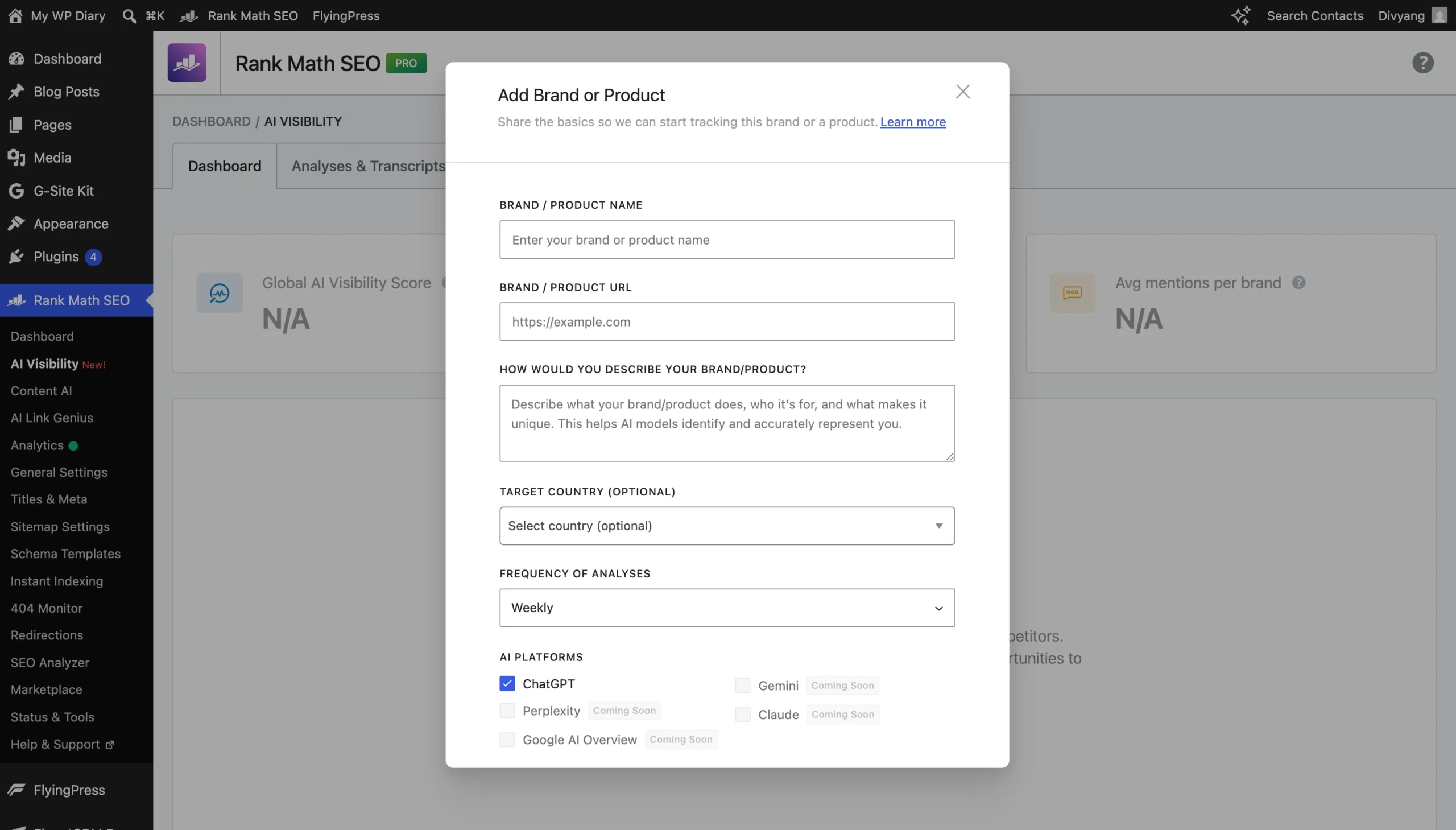
You also pick how often the analysis runs (weekly by default) and which AI platform to track. Right now, ChatGPT is the only live option, with Perplexity, Gemini, Claude, and Google AI Overview marked “Coming Soon” and expected to roll out soon.
Step 2: Review Queries
Once you add a brand, Rank Math doesn’t just start guessing questions on its own. It generates a set of baseline queries meant to reflect how real users would actually ask about your brand or product, and lets you review them under the Queries tab before tracking begins.
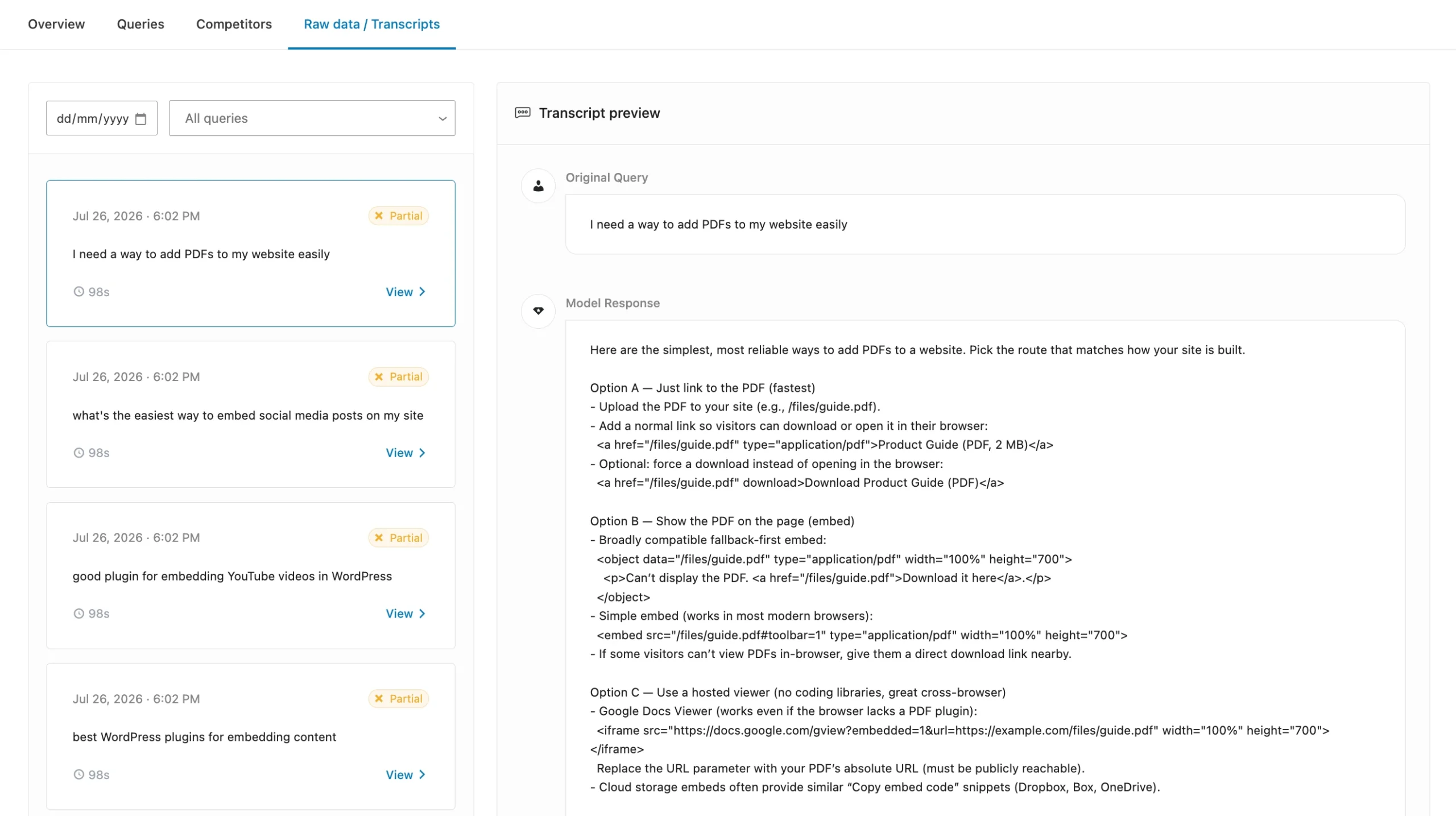
To see this in action, I added a demo brand for an iframe plugin and let Rank Math generate its baseline queries. Here’s what came back: natural, real-world questions like “best WordPress plugins for embedding content” and “what’s the easiest way to embed social media posts on my site,” all marked Enabled and ready to track.
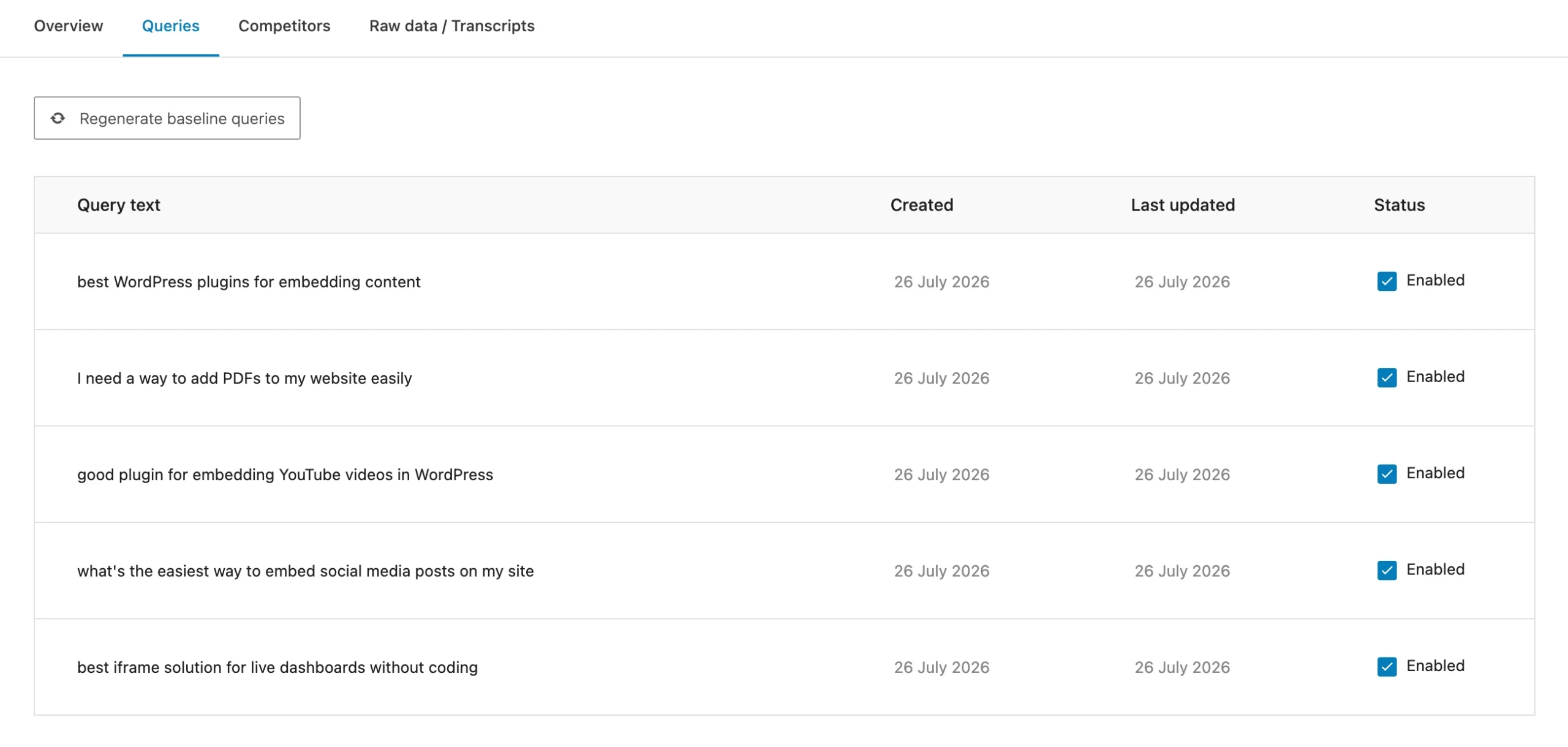
If the list doesn’t look quite right, one click on Regenerate Baseline Queries refreshes it.
Step 3: Analyze Results
With the queries confirmed, Rank Math runs them against the AI platform and starts pulling back results automatically: mentions, sentiment, citations, and how each of these shifts over time. No manual checking, no copy-pasting questions into ChatGPT yourself. It just runs on schedule.
That’s the entire loop. Add a brand, confirm what it gets tested against, then let the data roll in.
What Are the Key Features of Rank Math AI Visibility?
Once it’s tracking, AI Visibility breaks down into six pieces that actually matter.
AI Visibility Dashboard
This is the home screen for the whole feature: your Global AI Visibility Score, how many analyses ran in the past 24 hours, average mentions per brand, and a table listing every brand or product you’re tracking with its score, average rank, average sentiment, mentions, and citations laid out side by side.
AI Visibility Score
This is the number worth checking first. It folds your rank, citations, mentions, and sentiment into a single score out of 100, so instead of juggling four separate metrics, you get one figure that tells you, at a glance, whether your AI visibility is improving or slipping over time.
Sentiment Tracking
A mention isn’t automatically a good thing. Getting name-dropped as a cautionary example is very different from getting recommended as the best option. Sentiment tracking breaks every mention into positive, neutral, or negative, so you can tell the difference and act on it instead of just celebrating the mention count going up.
Competitor Benchmarking
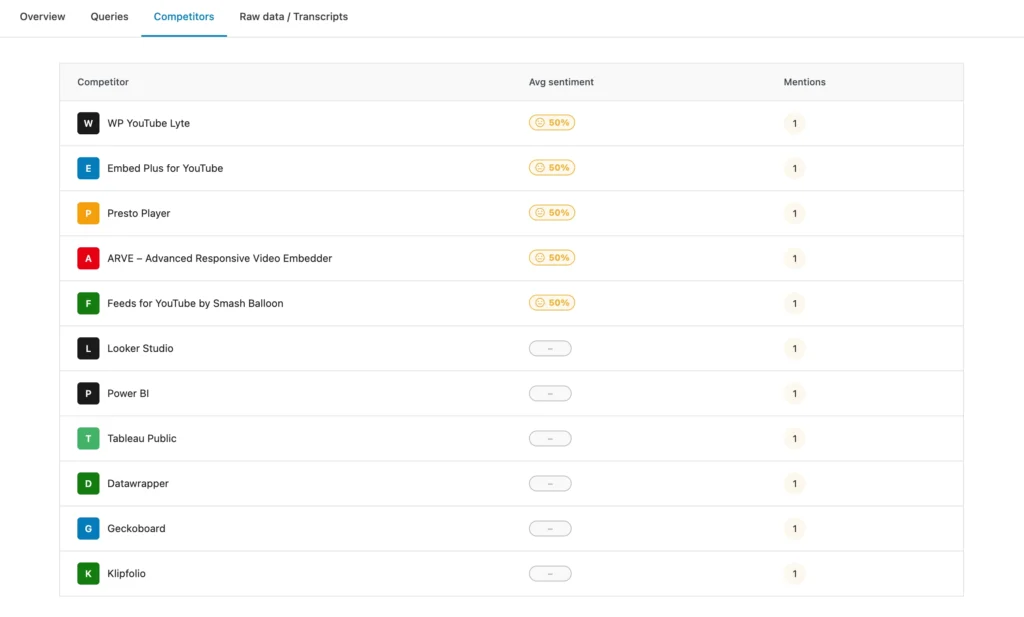
The Competitors tab is where you see exactly how you stack up. It lists every brand that showed up in the same AI answers as yours, along with its sentiment and mention count.
In the demo iframe plugin brand, this tab pulled in expected rivals like WP YouTube Lyte and Embed Plus for YouTube, each at 50% sentiment with one mention. It also surfaced dashboard tools like Looker Studio and Power BI, since one query asked about embedding live dashboards.
That’s a useful reminder: AI platforms don’t just compare you to your closest rivals, they pull in anything relevant to the actual question being asked.
AI Response Transcripts
Scores and sentiment percentages only tell you so much. The Raw Data/Transcripts tab shows the actual query and the full AI-generated answer, word for word, so you can read exactly how the AI platform described your brand instead of guessing what’s behind the number.
This is where the AI citation checker part of the tool really proves itself. You get to see the citation in context, not just a count of how many times it happened.
Export Your Data
Once you’ve got something worth sharing, you don’t need to screenshot the dashboard. AI Visibility lets you export your data for reporting, presentations, or deeper analysis, whether that’s handing a clean report to a client or folding the numbers into a broader SEO and brand performance review.
Why Citations Are the Real Currency Here
Mentions get the attention, but citations move the needle. AI models lean on trusted sources when building an answer. The more your content gets cited, by other sites and by AI platforms directly, the stronger your AI visibility score climbs.
This is where the Partial status on that demo transcript makes sense. A mention doesn’t always mean a full citation. Sometimes AI folds your brand into the answer without crediting or linking back, and that gap is exactly what an AI citation tracker is built to catch.
Once you know where your citations stand, the real work begins: earning more of them. That means structuring content the way AI platforms actually read it, a different skill from ranking on Google. We’ve covered that in Optimize Your Content for AI with Rank Math SEO.
AI Visibility tells you if it’s working. That post tells you how to make it work.
Getting Access to AI Visibility
One thing worth knowing upfront: AI Visibility isn’t part of the free plugin. It’s a Content AI feature, so you’ll need an active Content AI subscription to turn it on.
Access is tiered by how many brands or products you can track: one on the Starter plan, ten on Creator, and fifty on the Expert plan. Pick based on whether you’re tracking a single site or managing several client brands.
If you haven’t explored Content AI yet, it’s worth a proper look beyond just this feature. We’ve broken down the full toolkit, RankBot, the 40+ AI tools, and the pricing, in our Rank Math Content AI Review.
Frequently Asked Questions
What counts as an AI citation, and how is it different from a mention?
A mention just means your brand got named in the answer. A citation means the AI actually credited or linked back to your content as the source. AI Visibility tracks both, so you can see which mentions are backed by a real citation and which aren’t.
How is this different from regular rank tracking?
Rank tracking watches your position on a search results page. AI Visibility watches whether AI tools mention you at all when someone asks a related question, since there’s no results page involved.
Can I track my competitors too?
Yes. Every brand report includes a Competitors tab showing which other brands got pulled into the same AI answers, along with their own sentiment and mention counts.
How do I get my brand recommended by AI more often?
You can’t control it directly, but you can influence it: publish authoritative content, earn real citations, and build topical trust. AI Visibility is how you measure whether that effort is actually paying off.
Final Words
The AI answer box isn’t going away, and neither is the competition for a spot in it. AI Visibility is one of the first tools built directly into WordPress that tells you where you actually stand, not where you hope you stand.
Add a brand, review the queries, and let the data do the talking. Whether you’re checking your first citation or your fiftieth, know before you guess.
Have you tried tracking your brand’s AI visibility yet? Drop your score in the comments, we’d love to see how it’s showing up.

Thank you, you’ve explained it very clearly. I really like the AI Visibility feature.