
Rank Math recently crossed 4 million active installations on WordPress, and once you dig into the features, the growth makes complete sense.
I have been using it for a while now – from the very basics of on-page SEO all the way to AI-powered internal linking and content optimization. And the more I use it, the more I realize how many features actually change the way you work, not just the way your posts score.
Rank Math comes loaded with features. But these 7 are the ones I keep going back to. The ones that have actually moved the needle on my site.
Key Takeaways
What Are the Best Features of Rank Math SEO?
Rank Math SEO is one of the most feature-rich WordPress SEO plugins available and a big chunk of it is free.
Here is what this post covers:
– On-Page SEO Analyzer
– Schema Markup Generator
– Instant Indexing
– Rank Tracker
– Content AI
– AI Link Genius
– Google Search Console Integration
Whether you are just starting out or managing a growing site, these 7 features cover everything from writing your first optimised post to fixing a broken link structure, all without leaving WordPress.
7 Best Features of Rank Math SEO Plugin
Let’s get into it. These are not just feature descriptions pulled from a changelog. These are features I use regularly – and features that have made a real difference on my own WordPress sites.
1. On-Page SEO Analyzer (25+ Checkpoints)
This is the one that hooks every beginner. And honestly, it keeps veterans honest too.
When I started blogging, it was hard to keep track of what I needed to optimize – focus keyword in the title, keyword in the URL, alt tags on images, meta description length, internal links. The list never ended.
Rank Math puts all of that into one clean sidebar checklist right inside the WordPress editor.
You enter your focus keyword, and Rank Math instantly checks 25+ SEO factors. Keyword placement in the title, meta description, headings, URL, content body, all highlighted with green ticks or warnings. You can also add multiple keywords if you’re targeting more than one.
How Rank Math helps: Each item in the checklist has a small help icon. Click it and you get a plain-English explanation of what to fix and why it matters. No SEO jargon. No Googling. Just follow the list and optimize.
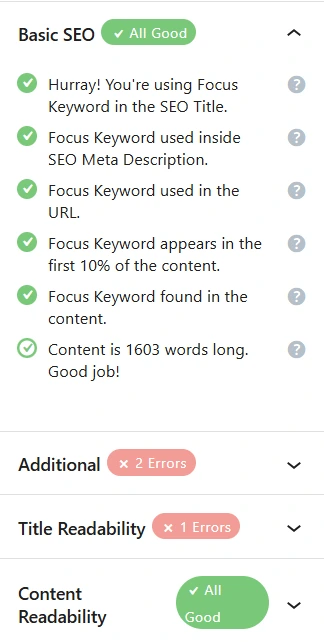
Your target is to hit an SEO score of 80 or above. That’s the green zone. Once you’re there, your on-page SEO is solid.
This feature is available in the free version. No upgrade needed to start optimizing every post you write.
2. Schema Markup Generator (20+ Types)
Schema markup is one of those things that sounds technical but pays off in a very visible way.
When you search on Google and see star ratings under a result, an FAQ dropdown, a recipe card with calories and cooking time, that’s schema. It tells Google (and AI crawlers) exactly what your content is about. Not just the words, but the meaning and structure.
Without schema, your content is just text. With schema, it becomes structured data that search engines and LLMs can understand and use.
How Rank Math helps: Rank Math’s Schema Generator supports 20+ schema types: Article, FAQ, HowTo, Product, Recipe, Local Business, Video, and more. You can apply them with a few clicks, no coding required. You can even stack multiple schemas on one post.
You can also validate your schema right inside WordPress using Google’s Rich Results test. One less tab to switch to.
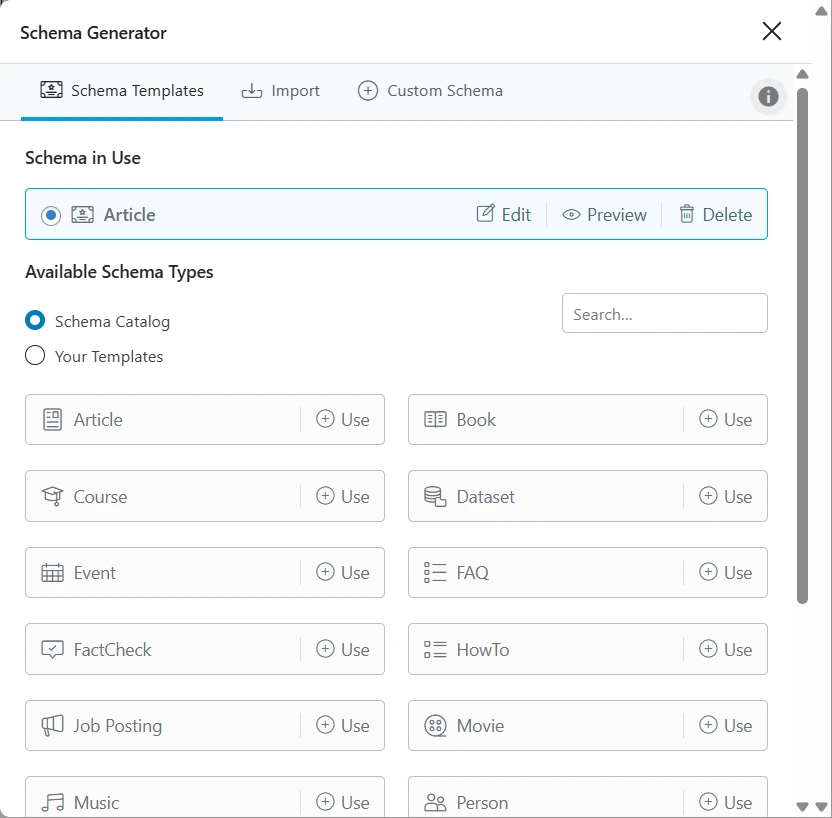
Here’s why this matters for LLMO specifically: AI chatbots like ChatGPT, Perplexity, and Google AI Overviews pull structured data when forming answers. FAQ schema and HowTo schema are especially powerful, they help AI understand your content in question-and-answer format, which is exactly how people query these tools.
I covered this in depth in my post on how to optimize your content for AI with Rank Math SEO, if you want to go deeper on the LLMO angle, that’s the place to start.
The Schema Generator is available in both free and Pro versions, with advanced schema types and custom schemas unlocked in Pro.
3. Instant Indexing
You write a post. You hit publish. And then… you wait.
Sometimes Google picks it up in a few hours. Sometimes it takes days. If you are publishing time-sensitive content or trying to build momentum on a new site, that wait is painful.
Rank Math’s Instant Indexing feature fixes that.
How Rank Math helps: It uses Google’s Indexing API behind the scenes. Once connected, you can request indexing for any URL directly from your WordPress dashboard, no Google Search Console, no technical setup. You can send requests automatically on publish or manually when you want more control.
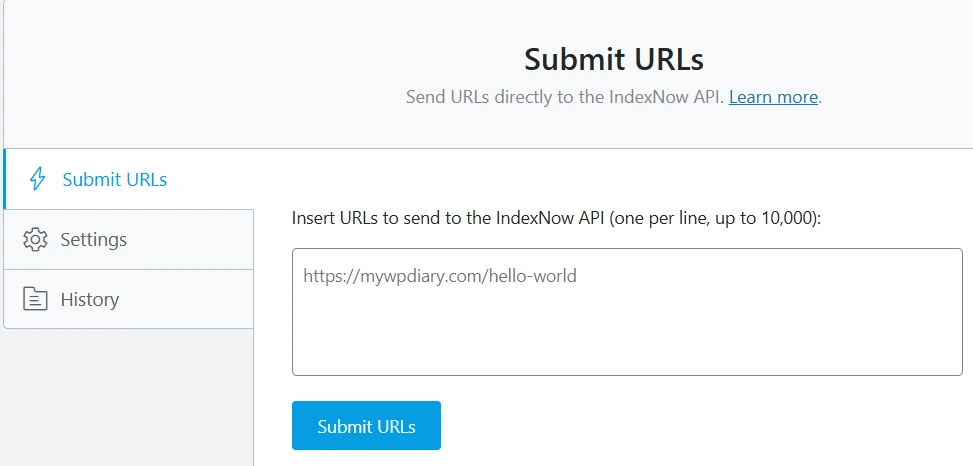
I use this every time I publish something new. It is one of those features that feels small until you actually use it. Then you wonder how you managed without it.
This is a Pro feature.
4. Rank Tracker + Keyword Position History
Publishing a post is the beginning, not the end. The real question is where does it rank?
Before Rank Math, I was checking Google manually or using a separate tool. Switching tabs, copying keywords, comparing dates. Not great.
Rank Math’s Rank Tracker brings all of that inside your WordPress dashboard.
How Rank Math helps: You add your target keywords and Rank Math tracks their positions over time. You can see which keywords are climbing, which have dropped, and where the quick wins are. The Keyword Position History chart shows changes across weeks and months, perfect for spotting when a content refresh actually worked (or didn’t).
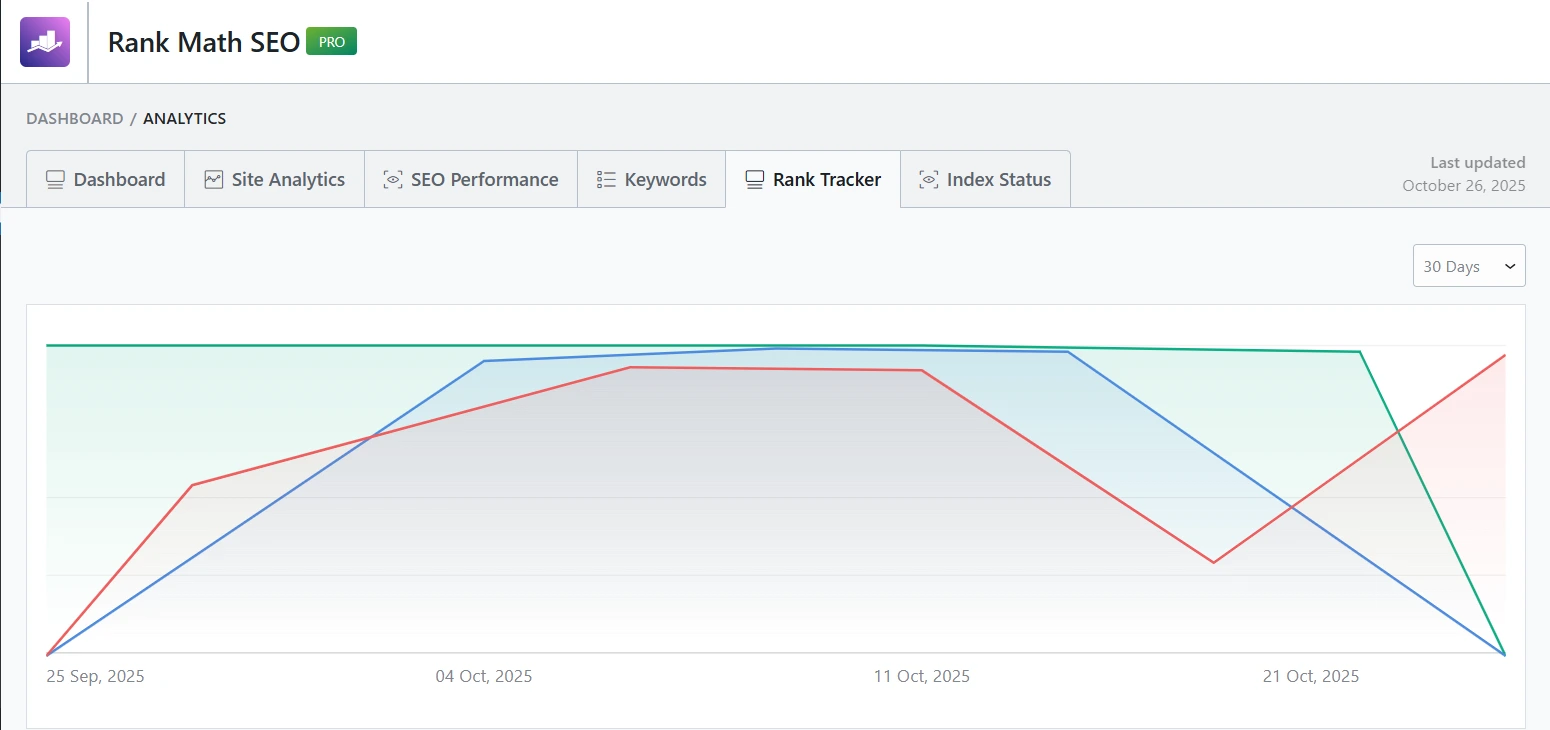
Combined with the Google Search Console integration, you get impressions, clicks, CTR, and average position, all in one place. No extra tool. No extra tab.
The fact that one of my posts reached the #1 spot on Google is partly because I was watching the keyword position history and knew when to make small optimizations. I shared the full story in my Rank Math SEO Achievement case study if you want to see exactly how that played out.
Rank Tracker is a Pro feature.
5. Content AI (40+ AI Tools)
This one deserves more attention than it usually gets.
Most people use Rank Math for SEO scoring. That is the obvious part. But Rank Math Content AI is where the workflow actually changes.
Before discovering it, I was switching between WordPress and ChatGPT constantly. Write a section, switch tabs, generate an intro, copy it back, tweak it, go back for the meta description. It was functional but exhausting.
How Rank Math helps: Content AI brings 40+ AI tools right into the WordPress sidebar. Blog post introductions, SEO titles, meta descriptions, FAQ generators, AIDA marketing copy, AI command tool, all available without leaving the editor.
There is also RankBot, a personal SEO assistant built in. Ask it questions, get keyword suggestions, get real-time SEO guidance as you write.
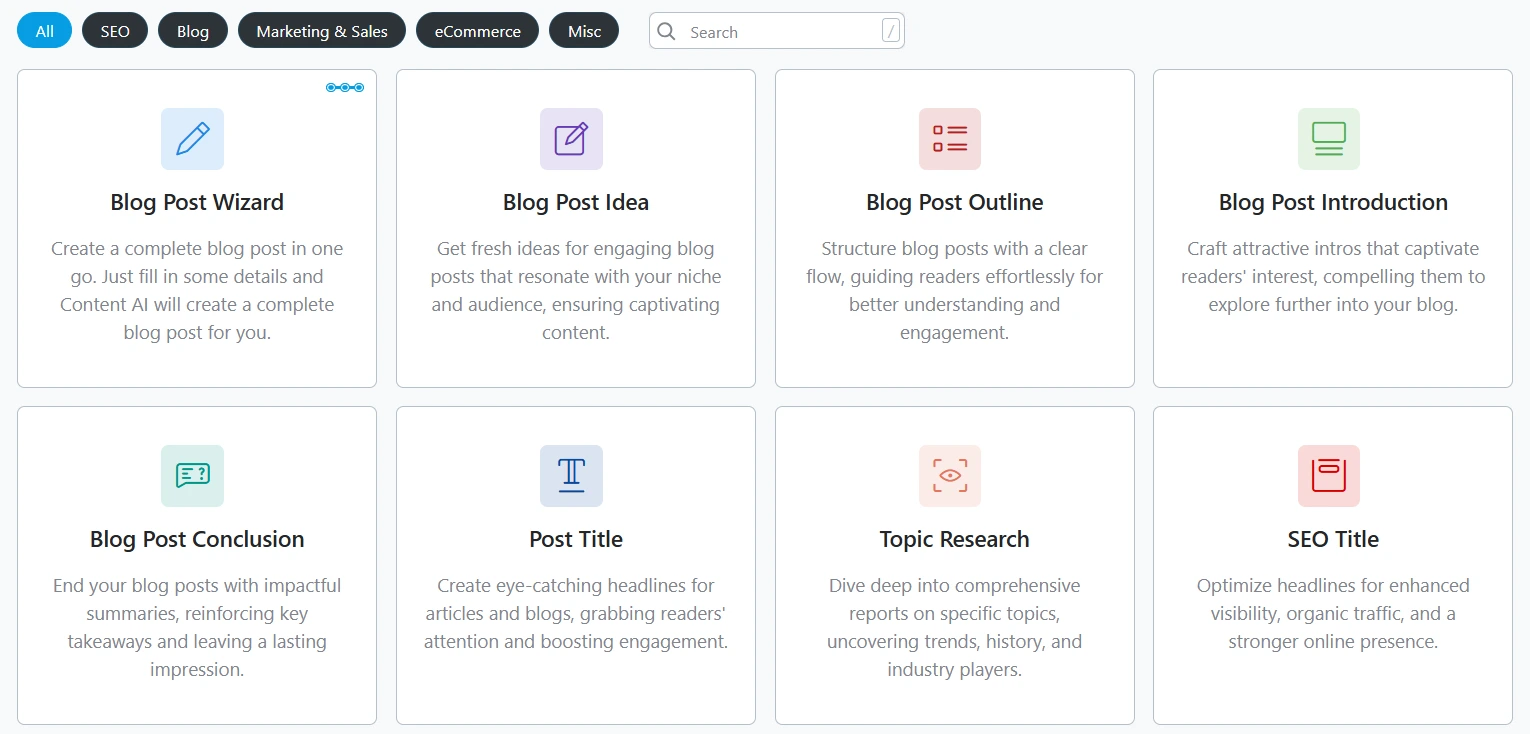
The tools are organized into five categories: SEO, Blog, Marketing & Sales, Ecommerce, and Miscellaneous. So whatever you are working on, there is a specific tool for it, not a general AI prompt box.
There is also a Content AI score separate from the SEO score. The SEO score checks technical factors. The Content AI score evaluates how well your content is actually written and optimized around the topic. Both matter.
I ran a live demo of these tools in my Rank Math Content AI review – you can see the actual outputs from several AI tools there.
Content AI is a Pro feature and runs on credits. The Pro plan starts with 1,000 credits/month.
6. AI Link Genius (Internal Linking, Automated)
Internal linking is one of those SEO tasks that everyone knows matters and almost nobody does consistently.
The reason? It is genuinely tedious. As your site grows, you lose track of which posts exist, which ones are orphaned, which links are broken. You end up with a messy link structure that leaks crawl budget and weakens your content clusters.
I ran into this problem firsthand. I had a site that went through a domain migration and never got a proper QA afterward. Months passed. Other projects kept winning.
When I finally opened AI Link Genius and ran the first crawl, here is what it found on a site with about 100 pages:
- 274 working links
- 42 broken links
- 66 redirects
- 40 robots blocked links
- 8 unchecked
Seeing that in one dashboard made it very real. The kind of real that makes you take a deep breath and get to work.
How Rank Math helps: AI Link Genius gives you a central dashboard for all your site’s links, broken links, redirects, orphan pages, robots-blocked links, all filterable and fixable from one place. The Bulk Link Update Tool lets you fix multiple broken URLs or update redirect chains across hundreds of posts at once, with a preview before anything changes, and a rollback option if something goes wrong.
While writing, it suggests relevant internal links right inside the editor as you highlight text. You also get auto-link keyword maps, define “internal linking” once, and AI Link Genius automatically links every variation of that phrase across future posts.
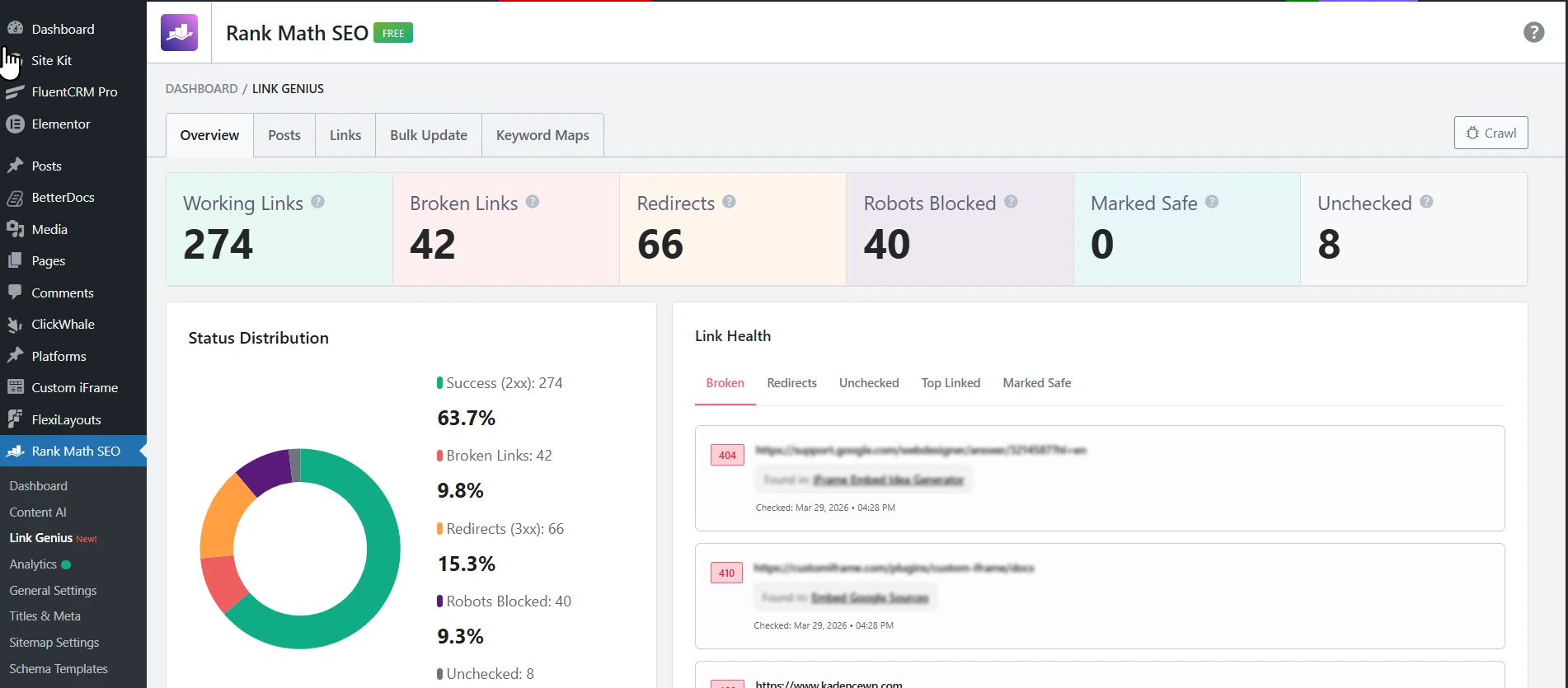
What would have been days of manual QA got done in a single session. That is the real value. Not just the features. The time you get back.
For a full breakdown of everything AI Link Genius can do, I have written about it in detail: Rank Math makes website internal linking super easy with AI.
AI Link Genius is a Pro feature. Though, you get limited access in free version.
7. Google Search Console Integration (Analytics Inside WordPress)
Last one. And it is the one that quietly saves the most time every week.
Google Search Console is essential. But logging into a separate dashboard every time you want to check impressions, clicks, or indexed pages breaks your workflow.
Rank Math brings the most important GSC data directly into WordPress.
How Rank Math helps: The Site Analytics dashboard inside Rank Math shows your search traffic, keyword rankings, indexing status, top-performing posts, and SEO performance, all without leaving WordPress.
You can see which pages are indexed, when they were last crawled, and your site’s overall visibility from the Google Index Status view. If something drops off, you catch it early, right where you are already working.
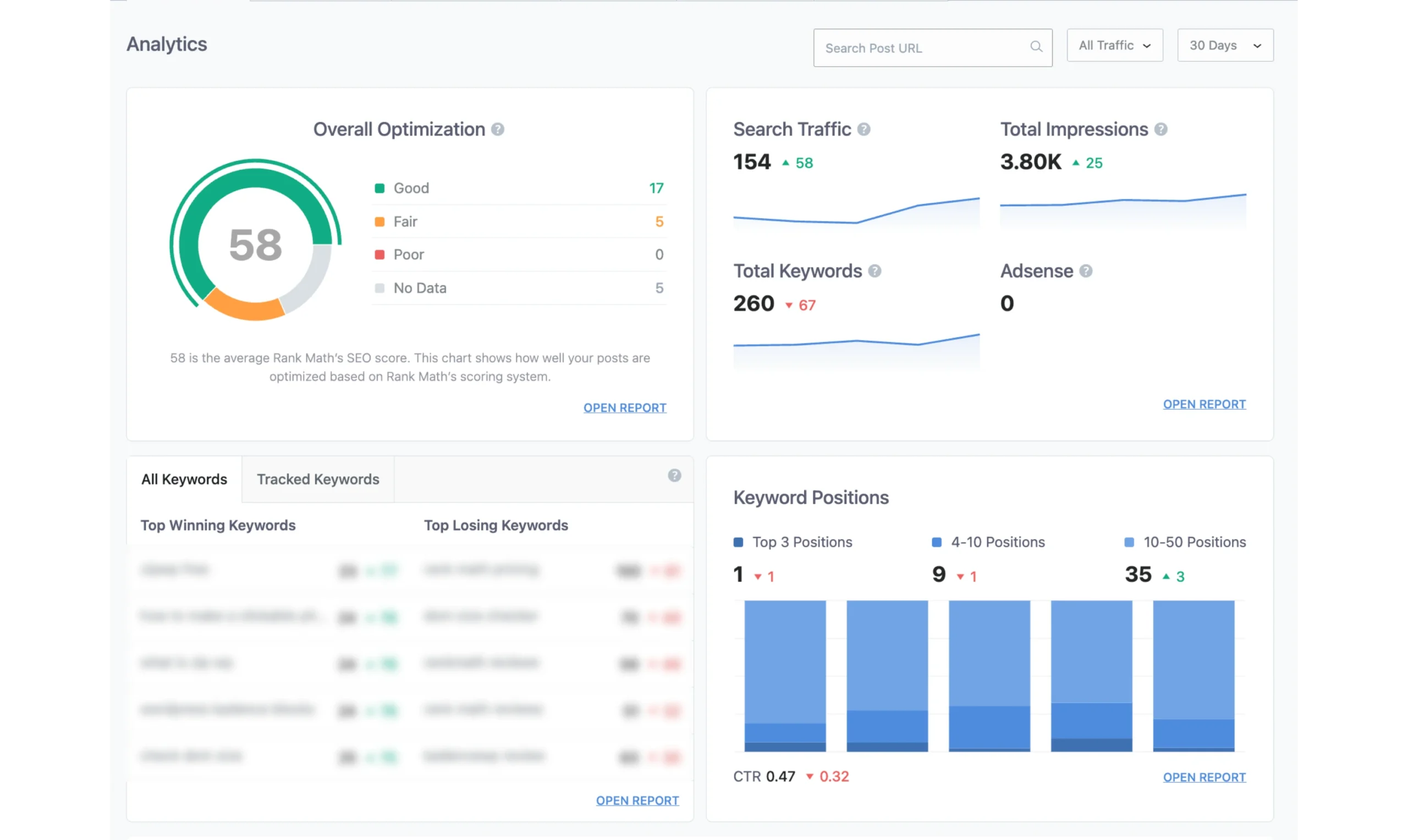
For beginners, this removes one of the biggest friction points: “I know I should check my analytics but setting up GSC feels complicated.” With Rank Math, it is connected during the setup wizard. After that, the data just shows up.
The basic GSC integration is available in the free version. Advanced analytics and rank tracking are Pro features.
Free vs Pro: What Do You Actually Need?
Here is a quick breakdown so you can decide:
| Feature | Free | Pro |
|---|---|---|
| On-Page SEO Analyzer | ✅ | ✅ |
| Schema Generator (basic) | ✅ | ✅ |
| XML Sitemap | ✅ | ✅ |
| GSC Integration (basic) | ✅ | ✅ |
| Instant Indexing | ✅ | ✅ |
| Rank Tracker | ❌ | ✅ |
| Content AI (40+ tools) | ❌ | ✅ (Separate Purchase) |
| AI Link Genius | Limited Access | ✅ |
| Advanced Schema Types | ❌ | ✅ |
| Advanced Analytics | ❌ | ✅ |
The free version is genuinely powerful – great for beginners and small blogs that need solid on-page SEO without extra costs.
The free version gets you started. But if you want to track rankings, automate internal links, and write faster with AI, Pro is where Rank Math really opens up.
Frequently Asked Questions?
Final Words
Seven features. One plugin. And genuinely, no other WordPress plugin packs this much into a single install without feeling overwhelming.
Whether you are optimising your first blog post or managing a 100-page site with broken links and redirect chains from a migration you have been putting off – Rank Math has a feature for exactly where you are.
Start with the free version and follow the on-page SEO checklist. Once you hit that 80+ score consistently, explore what Pro unlocks. The Rank Tracker, Content AI, and AI Link Genius alone will change how you work.
Have you used any of these features already? Which one surprised you the most? Drop a comment below. I would love to know. 👇