
Open any SEO community right now. Someone is sharing SEO skills, a GitHub repo, or an AI agent that auto-publishes 100 posts a day. A lot is going on.
Some of it is genuinely useful. No doubt.

But Rank Math did something different. They looked at the actual daily struggle of every WordPress site owner and built something that saves real hours.
That’s AI Link Genius.
We all know website internal linking matters. But we also know how messy it gets in practice. Google Sheets full of URLs, half-planned topic clusters, orphan pages sitting forgotten somewhere. It was a whole project on its own.
But not anymore.
Overview
How to Manage Website Internal Linking with AI?
Website internal linking gets messy as your site grows. Rank Math has a solution for this. It’s called AI Link Genius. It scans your entire site and finds broken links, orphan pages, and redirect issues. Then it gives you AI-powered fixes right inside your WordPress dashboard. No extra plugin. No spreadsheets. Just one clean dashboard.
Sounds interesting, right? Let me break down exactly what Rank Math has put together with this feature.
Meet Rank Math’s AI Link Genius
Think of AI Link Genius as a smart assistant who knows every single link on your website. Every page, every connection, every broken URL. And it never forgets.
When your site is small, managing internal links feels easy. You remember which posts exist, you know where to link, and it all fits in your head.
But once your site grows? That mental map breaks down fast.
More posts mean more links to track. More links mean more chances for things to break, redirect, or just go unnoticed. You start building Google Sheets, running extra QA rounds, and spending more time planning links than actually writing content.
And every time you write a new post, you have to stop and think: which pages should I link here? Then go find those URLs manually. Every. Single. Time.

AI Link Genius solves all of this.
You get a central dashboard for all your links, just like you have a dashboard for keywords. Broken links, redirects, orphan pages, link counts, everything is visible in one place. No more guessing. No more spreadsheets.
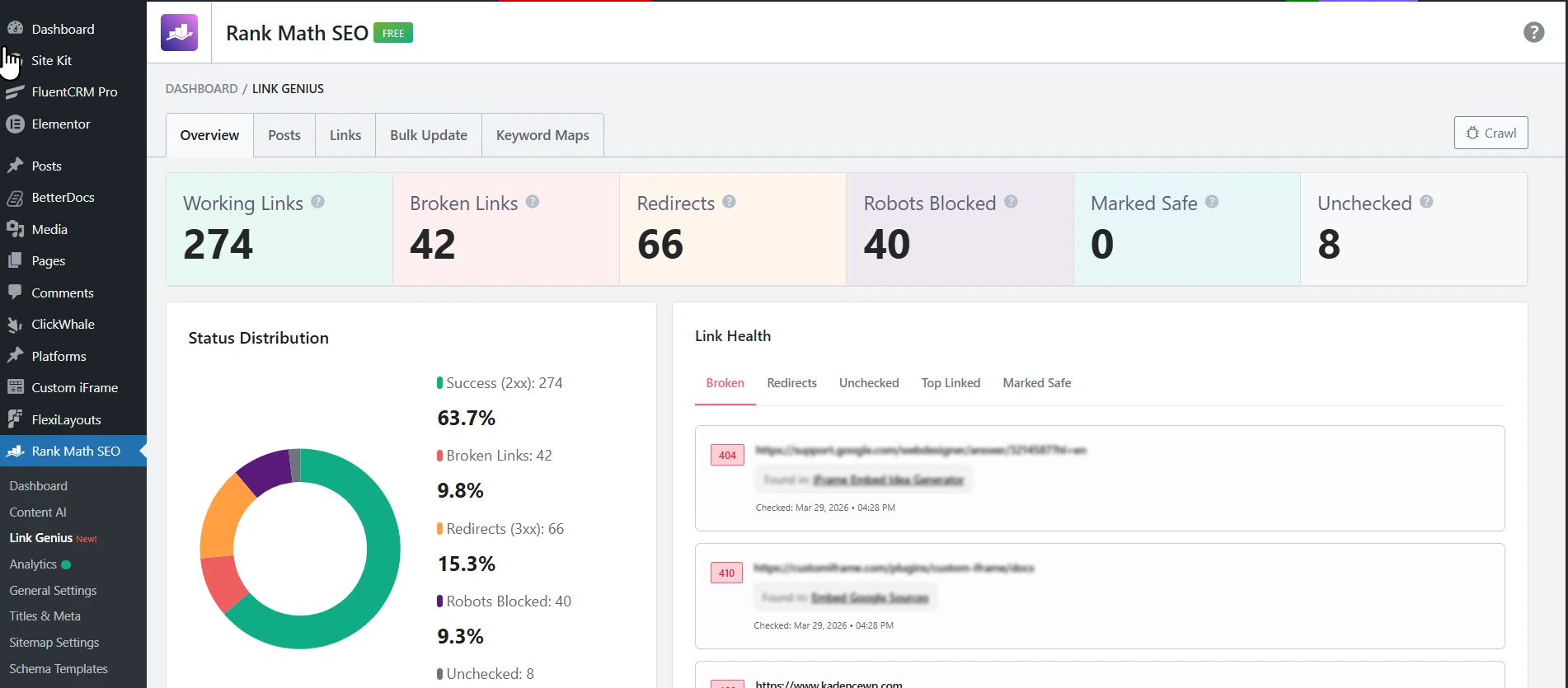
This is just the big picture. In the next sections, we will go deep into every feature, what it does, and exactly how you can use it to build a stronger content cluster and a tighter link network across your site.
What Are the Key Features of Rank Math AI Link Genius?
Let me tell you about a site I had been avoiding for a while.
The site went through a domain change a few months back. A proper QA was always on the list. But other projects kept winning. Weeks passed. Then months.
The site had around 25 blog posts, 50 docs, and 25 pages. Not a big site. But big enough to make manual link auditing a painful afternoon. So I finally opened AI Link Genius. Ran the first crawl.
Let me walk you through what I found, feature by feature.
Centralized Links Dashboard
Once you see the full picture, everything clicks.The dashboard shows you every link on your site in one place. Working links, broken links, redirects, robots blocked, unchecked links. All visible. All filterable. All fixable from the same screen.
For the site, here is what one crawl revealed:
- 274 working links
- 42 broken links
- 66 redirects
- 40 robots blocked
- 8 unchecked
I already knew QA was pending. But seeing it all in one screen made it very real. The kind of real that makes you take a deep breath and get to work.
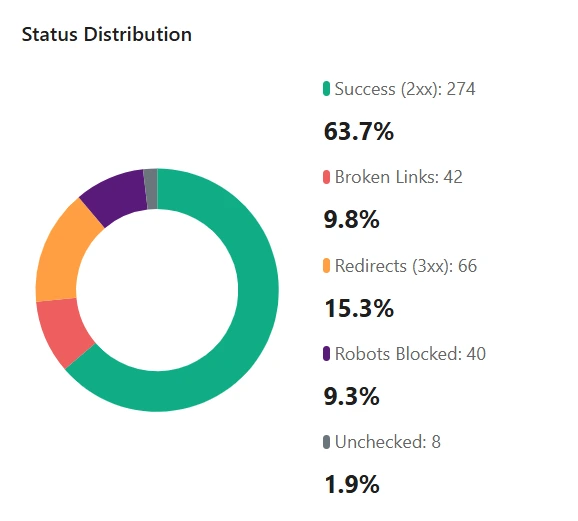
That dashboard overview told me a lot. But the broken links number hit the hardest. 42. So let’s talk about that feature first.
Broken Link Checker
The Broken Link Checker scans every internal and external link on your site. It flags anything returning a 4xx or 5xx error. You can filter by status code, link type, or post type to narrow down exactly what needs fixing.
Before this, finding broken links meant running a third party tool, downloading a report, and hunting them down one by one. That alone would take hours.
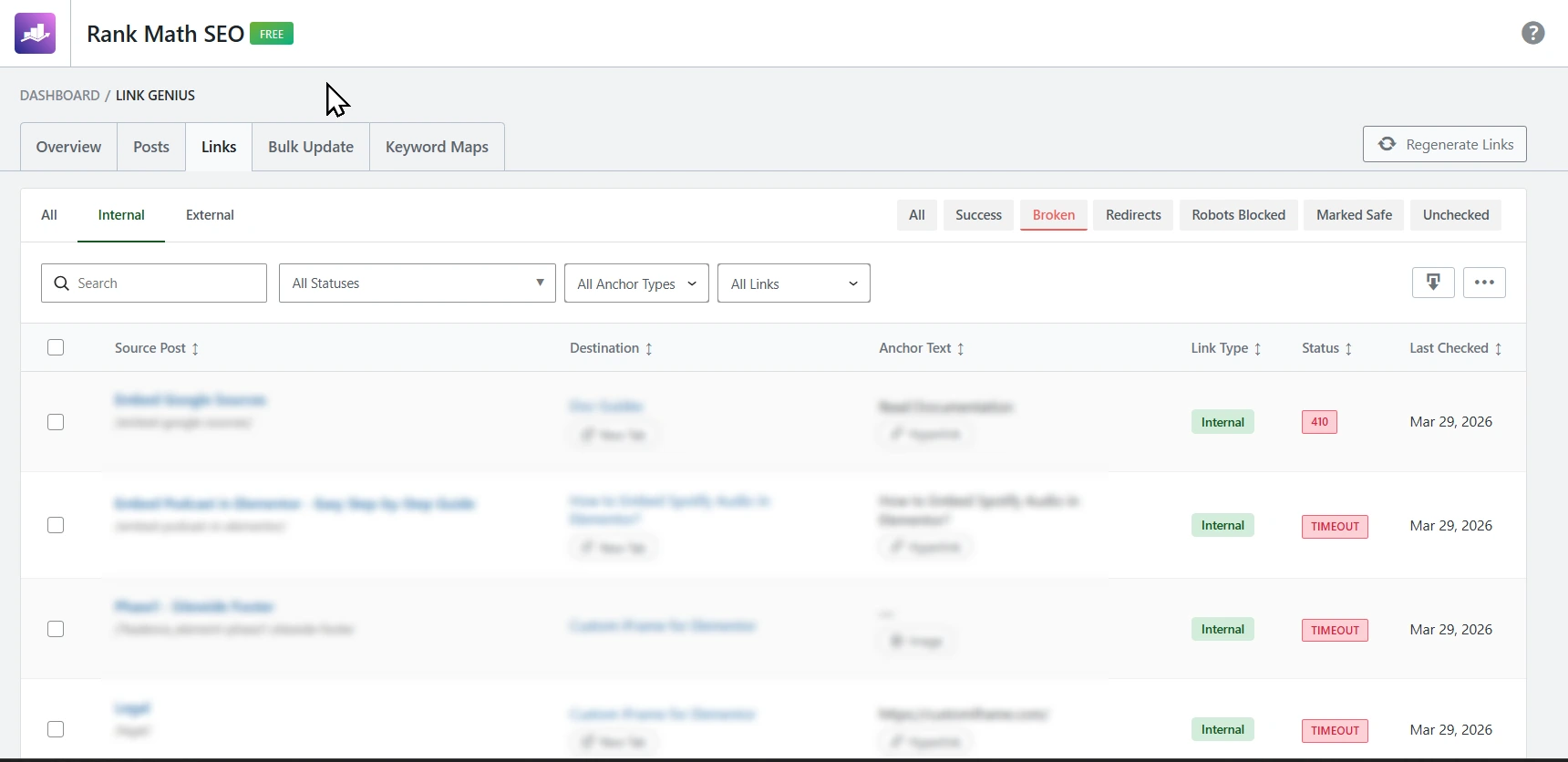
Here, I had the full filtered list in minutes. The actual URLs are blurred to keep the site private, but you can see how the filters work.
Orphaned Pages Detection
This one surprised me the most.
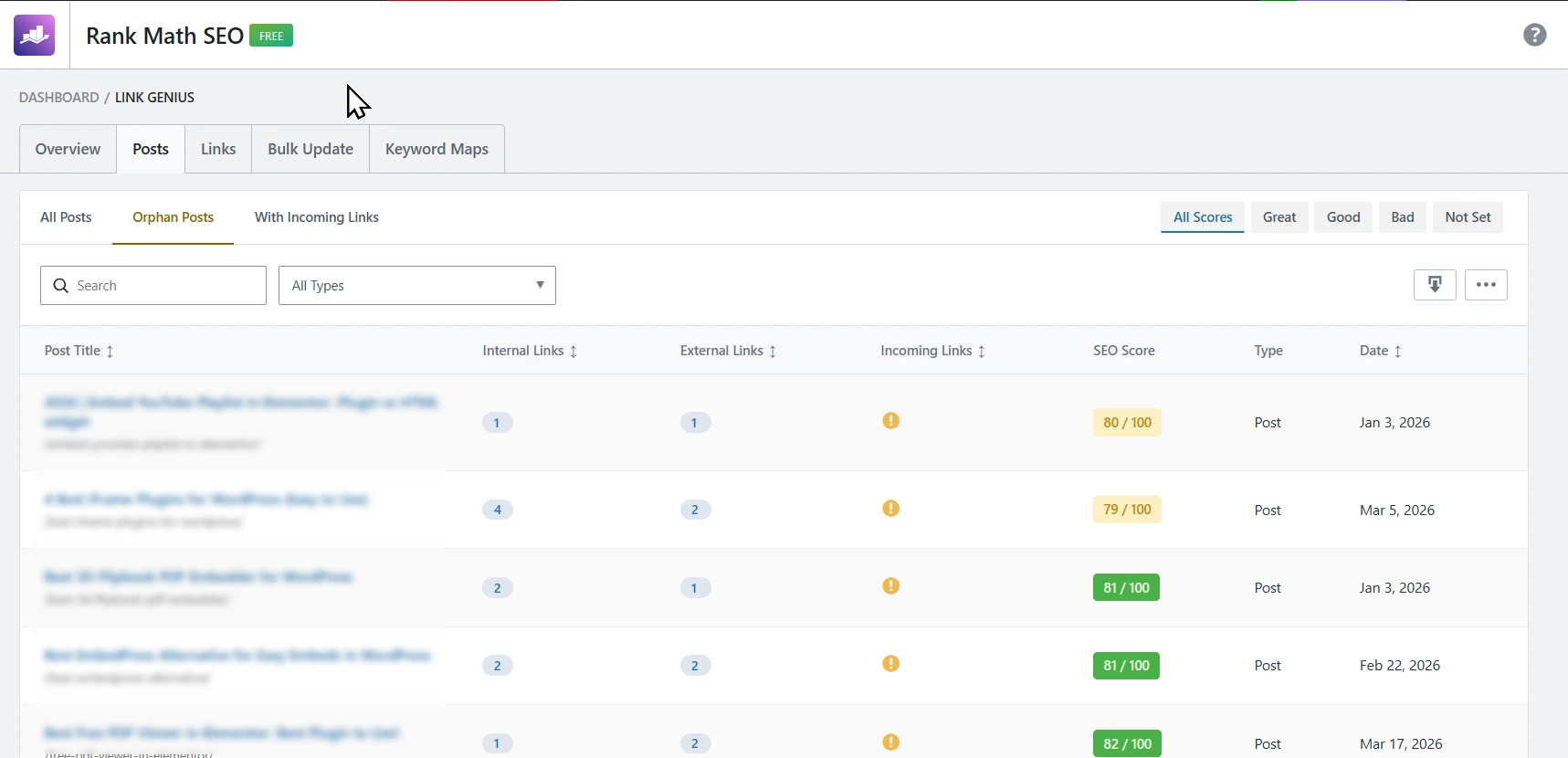
I found a large number of orphan pages spread across posts, docs, and pages. These are pages with zero incoming internal links. Google can find them through your sitemap, but they get almost no link equity and very little crawl attention.
After a domain migration, this makes complete sense. Pages get disconnected. Nobody catches it.
AI Link Genius flags every orphan page with a warning. You get a dedicated filter to see them all together. Then you start linking them back in.
Redirects Tracker
66 redirects on a ~100 page site is a lot.
After a domain migration, some redirects are expected. But letting them pile up means link equity leaks through unnecessary hops. Google follows each redirect before reaching the final page. That slows crawling and weakens authority flow.
The Redirects view shows every link pointing to a redirected URL. You update them to point directly to the final destination. Clean, simple, done.
Robots Blocked Links
This one is easy to miss without a tool.
40 links were pointing to pages blocked by robots.txt. These pages look fine on the front end. But Google cannot crawl them. So all the link equity you send there goes nowhere.
AI Link Genius surfaces all of them in one filter. One click to see the list. Fix them and your crawl budget stops going to waste.
Bulk Link Update Tool
Imagine fixing broken links, outdated URLs, and redirect chains one by one across hundreds of posts. That’s the kind of task that sits on your to-do list for weeks because you know how long it will take.
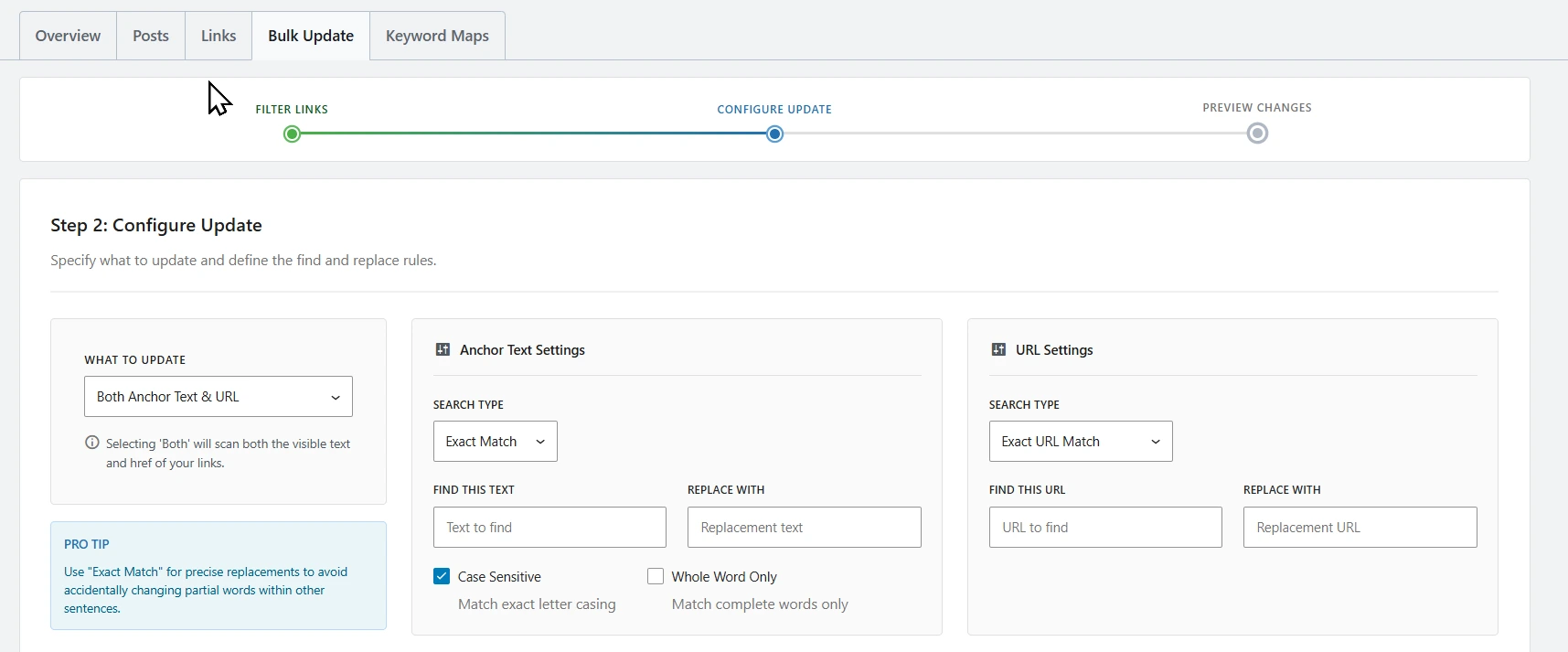
The Bulk Link Update Tool makes it manageable. You can update target URLs, anchor text, and link attributes across hundreds of posts at once. Before anything changes, you get a full preview of what will be affected. And if something goes wrong after applying, you can roll it back safely.
What could have taken days of careful, tedious manual editing becomes a single focused session.
Honestly? I am glad I kept putting off that QA. If I had done it manually, I would have lost days to it. AI Link Genius got it done in one session. 😄
How AI Link Genius Helps You While Writing
Fixing existing links is one part. But what about when you sit down to write a new post?
AI Link Genius has a few features built right into the WordPress editor that make internal linking smarter as you write, not after.
AI Link Suggestions Inside the Editor
Now for writing new content.
You highlight any text in the WordPress block editor. AI Link Genius suggests the most relevant internal page to link to, based on the context around that text. Anchor text gets optimized automatically too.
No more stopping mid-writing to search for a URL. No more opening another tab. The suggestion appears right where you are working.
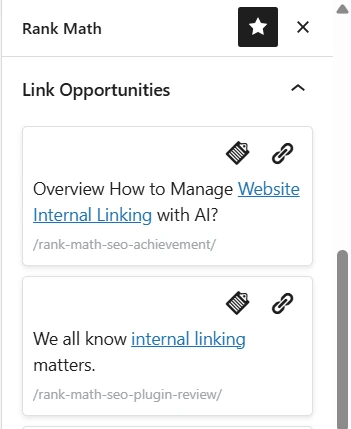
Auto-Link Keyword Variations
This is where the SEO compound effect starts.
You create one keyword to URL mapping. For example, “internal linking” always points to this post. AI Link Genius then generates smart variations like “internal links”, “website linking strategy”, “link structure” and maps them to the same URL.
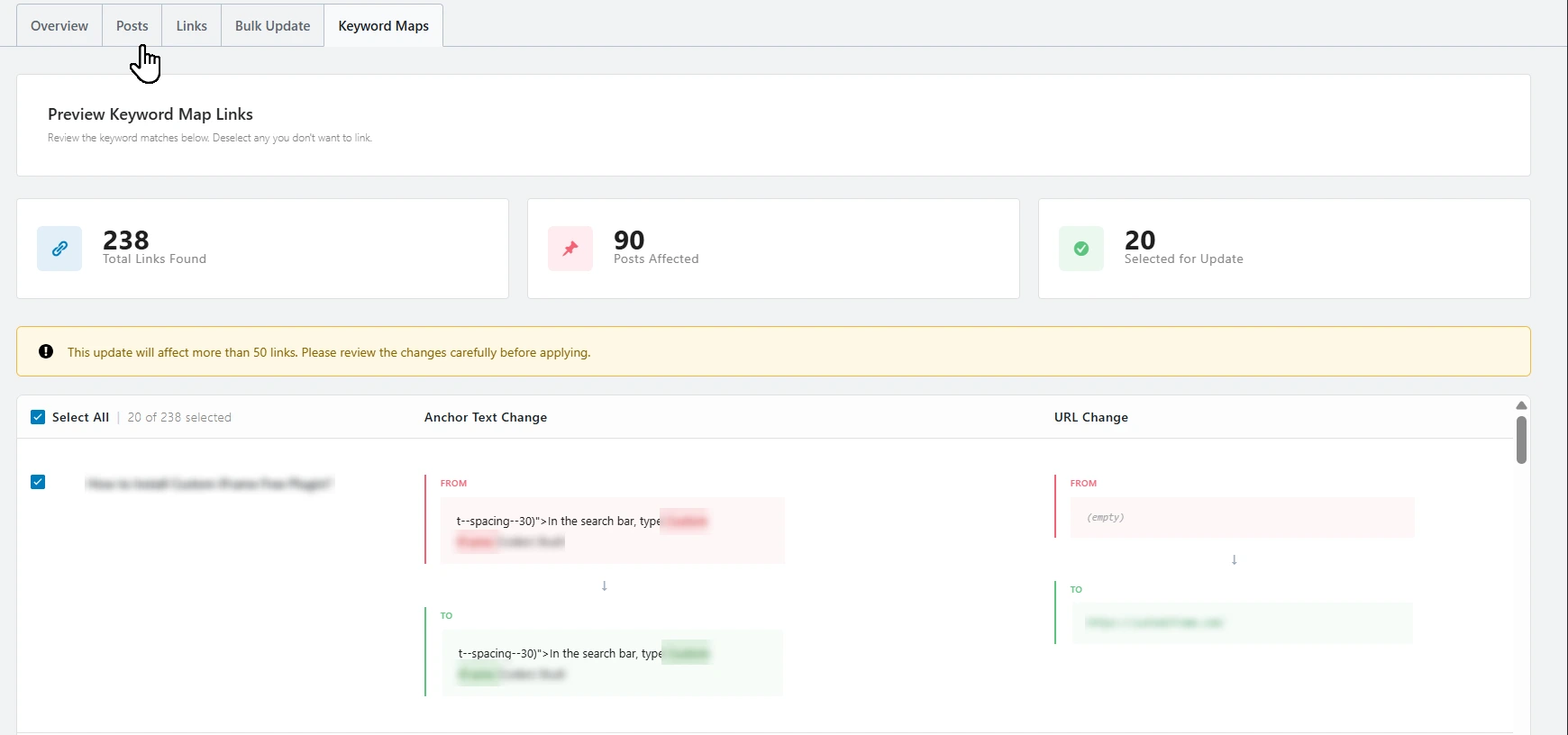
Every new post you publish that contains any of those variations gets the link added automatically. Your content cluster gets stronger with every post you write. No extra work.
AI Recommended Related Posts
Last one. And a quiet performer.
Instead of showing random recent posts at the bottom of your articles, AI Link Genius recommends truly related content based on topic relevance. Readers stay longer. Bounce rate drops. Your internal link network gets stronger naturally.
You add the related posts block from the sidebar with one click.
My Experience with Rank Math AI Link Genius
I have been using Rank Math for a long time now.
It started with the basic SEO features. Then I explored Rank Math Content AI and it completely changed how I write and optimize content. 40+ AI tools right inside WordPress. No switching tabs. No extra subscriptions.
And now AI Link Genius.
Internal linking was always the task I kept pushing to later. Not because it was hard to understand. Because it was hard to manage. Now I open one dashboard, see the full picture, and know exactly what needs fixing.
What I love about Rank Math is that every new feature feels like it belongs. Nothing feels forced or overwhelming. You enable what you need, ignore what you don’t, and everything sits exactly where you expect it. That is rare in a WordPress plugin.
The site I tested this on had been unmanaged for months. AI Link Genius gave me a complete audit in one crawl. What would have taken days of manual work got done in a single session.
That is the real value here. Not just the features. The time you get back.
For a deeper look at everything Rank Math offers including pricing, check out my full Rank Math SEO plugin review.
Final Words
If you run a WordPress site and care about SEO, Rank Math is the plugin to have.
It covers everything. On-page SEO, schema, Content AI, LLMO, and now internal linking with AI Link Genius. All packed in one plugin. All easy to navigate. All in the right place.
Most plugins do one thing well. Rank Math keeps adding the right things at the right time. And that is what makes it the go-to plugin for WordPress SEO, AI SEO, and now LLM SEO management.
Try AI Link Genius on your site. Then drop your experience in the comments below. I would love to know what your first crawl revealed.